


 Admin
AdminManually creating ad campaigns for every long-tail query is a task where businesses lose time and money. Classic Google Ads automation solves some problems, but not the main one: where do you find scaling opportunities? The answer lies in the data you already have. This material is a breakdown of a full-fledged production workflow that turns SEO assets into a PPC lever. This system, known as an SEO-to-PPC pipeline, independently finds growth opportunities, qualifies them using AI, generates ad copy, and launches them in Google Ads. It operates almost autonomously, requiring only human oversight and strategic decisions.
Google Ads Automation: Saving Time and Increasing Efficiency
In practice, implementing such a pipeline yields specific and measurable results.
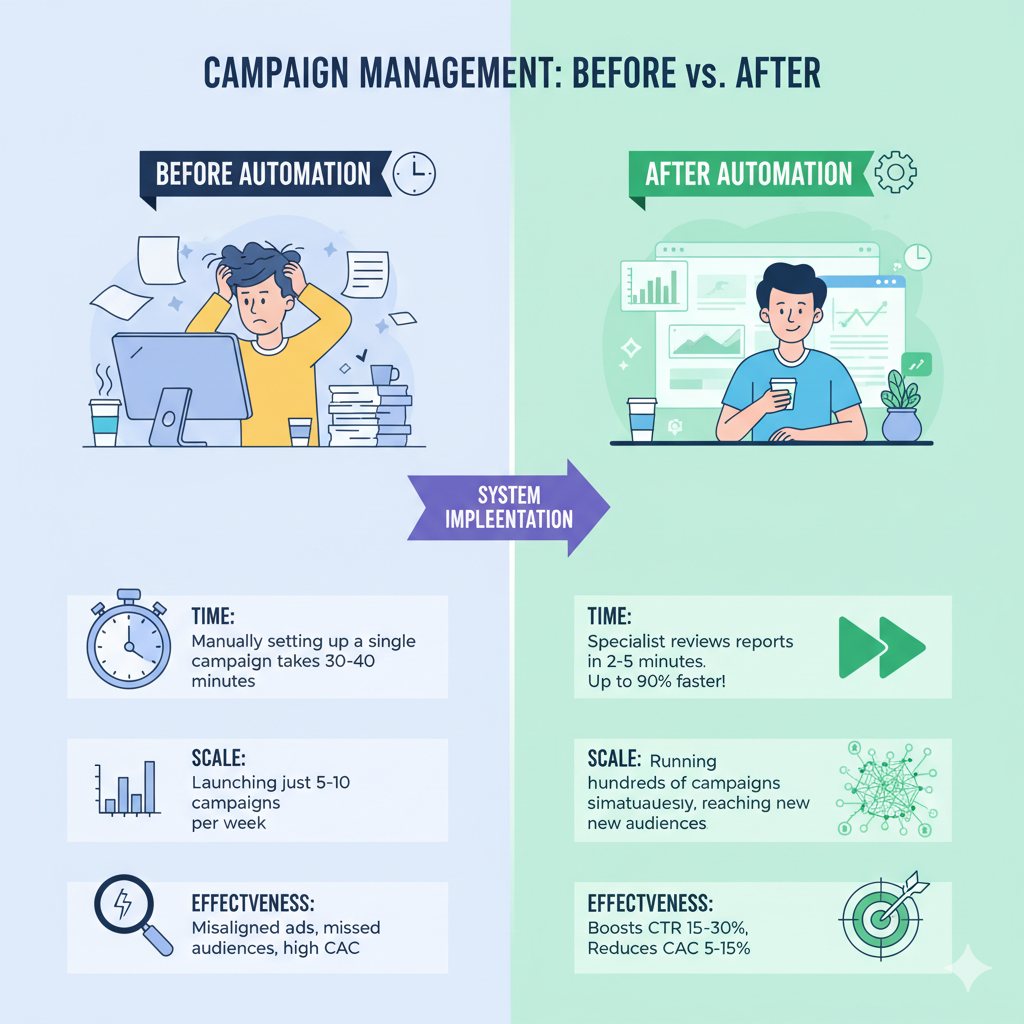
Time: The manual setup of one campaign takes 30-40 minutes. The system does this in the background, while a specialist spends 2-5 minutes reviewing reports. The work is completed 90% faster.
Scale: Instead of the 5-10 campaigns per week that a specialist could launch manually, the system can create hundreds. You start working with an audience that you simply didn’t have the capacity to reach before.
Efficiency: By perfectly matching the customer’s query, the CTR (click-through rate) increases by 15-30%, and the customer acquisition cost decreases by 5-15%.
SEO-to-PPC Pipeline: A Step-by-Step Guide
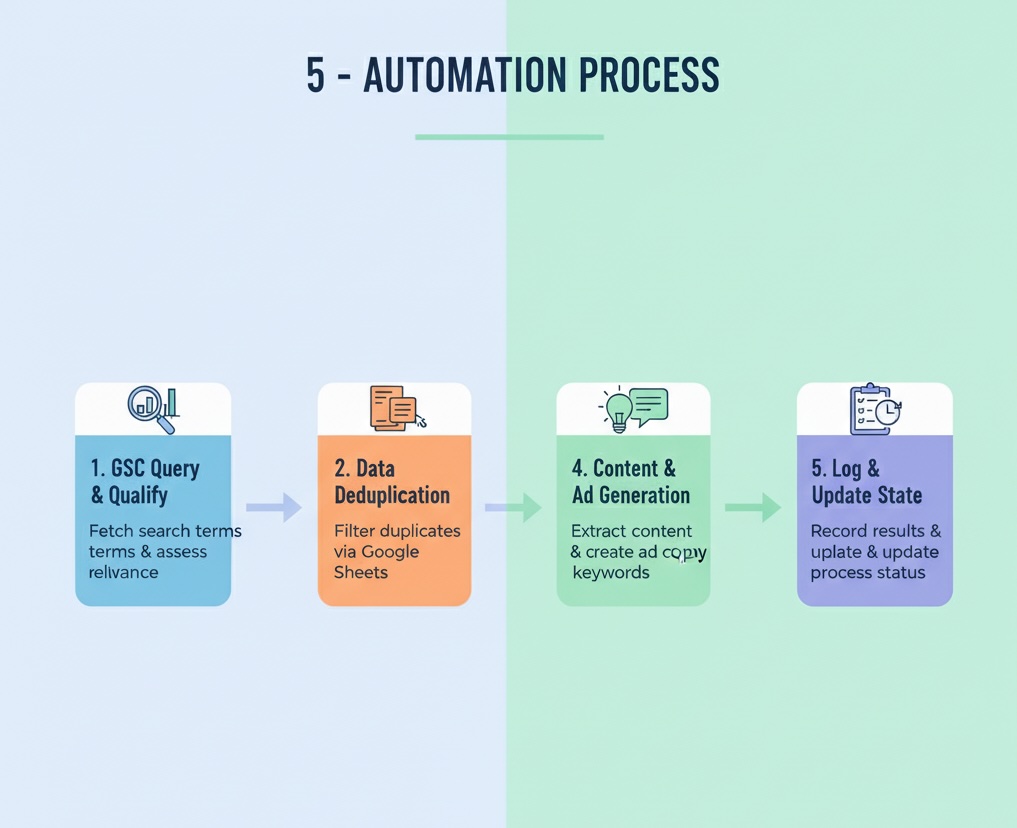
The entire process is a clear sequence of steps that the system follows automatically for each search query it finds.
AI in Google Ads: A Practical Case Study and Business Benefits
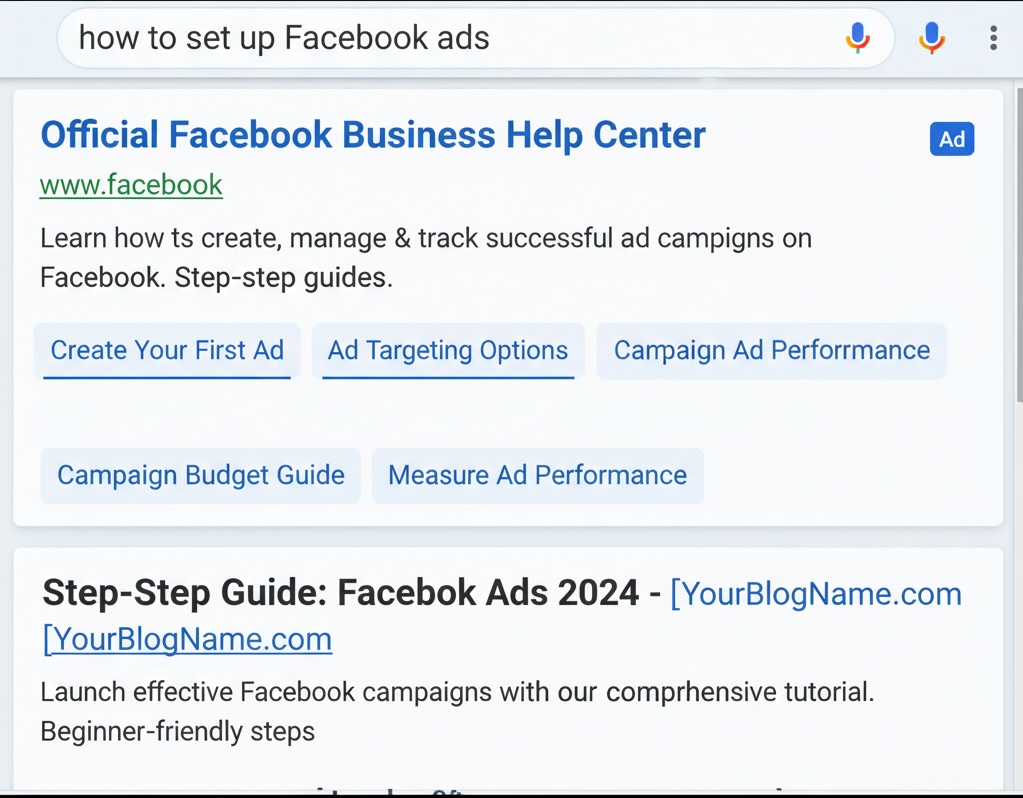
Let’s see how this works with an example of a popular service: “how to set up Facebook ads.” Finding: The system sees that your article “Setting Up Facebook Ads from Scratch: The Complete 2025 Guide” is being shown for this query, but only in the 15th position. This is an excellent candidate. Analysis: The AI analyst reviews the article and confirms: the content fully matches the query. It gives the go-ahead. Ad Copy Creation: The AI copywriter instantly generates several ad variations:
- Headlines: “Facebook Ad Setup,” “Facebook Ads from Scratch,” “Facebook Ads Guide,” “How to Set Up Ads,” “Step-by-Step 2025 Guide,” “Effective Targeting,” “Setup Services.”
- Descriptions: “A step-by-step guide to setting up Facebook ads for beginners. All stages from A to Z.”, “Learn how to correctly set up targeted ads on Facebook and not waste your budget. 2025 Guide.”, “Professional Facebook ad setup. We attract clients for your business.” Search Result (mockup):
The Pipeline’s Detailed Logic: A Look “Under the Hood”
Now, let’s break down each stage in more detail to understand how the system makes decisions.
Step 1: Data Collection from Google Search Console (GSC)
It all starts with GSC, a free tool from Google that shows the real queries people use to see your site in search results. Unlike theoretical research, GSC is the direct voice of your customer. The system connects to this tool and identifies “low-hanging fruit” queries where you already have potential (impressions) but are outside the top positions. Before doing anything, the system checks against its database to eliminate duplicates and avoid launching ads for the same keyword twice.
Step 2: AI Qualification and Viability Assessment
Not every query found is a good investment. This is where the first AI analyst comes into play. Like an experienced marketer, it quickly evaluates each opportunity. It checks the “query-page” pairing and answers key business questions:
- Is it relevant? If someone is searching for “Facebook ads” but the page sells SEO services, the AI will notice this and reject the idea, saving your budget.
- What is the customer’s intent? Are they just “browsing” (informational query) or are they ready to buy (transactional)? This helps determine how aggressive the ad should be. Only those queries that the AI deems promising are moved forward. Junk is filtered out at the source.
Step 3: Ad Copy Generation with AI
For the approved queries, the second AI, now in the role of a creative copywriter, gets to work. It doesn’t just plug keywords into a template. It reads and understands the meaning of your article and then writes a complete ad set for a modern responsive Google ad based on it: 15 unique headlines and 4 description variations. This ensures maximum semantic consistency between what the person is searching for, what they see in the ad, and what they find on the page. This approach is favored by both users and Google’s algorithms.
Step 4: Automated Campaign Launch in Google Ads
Next, the system interacts directly with your Google Ads account via an API (a special, secure “bridge” for programs), without human intervention. It handles all the technical work itself:
- Creates a new, cleanly structured ad group with a clear name for easy analysis.
- Adds the keyword with the appropriate match type to filter out irrelevant impressions.
- Creates the final URL with UTM tags. These are special “beacons” in the link that allow you to see exactly how many leads and sales this system’s work has generated in your analytics system.
- Launches the completed ad, assembled from the AI copywriter’s best texts.
Step 5: Monitoring and Reporting
The system is designed to be transparent and reliable. It records every action in a log file. If a problem arises at any stage (for example, your website page is temporarily unavailable), the task is not lost but is placed in a special “needs attention” report. Successful launches are also logged. As a result, you always have your finger on the pulse, receiving a daily report on the work done without getting bogged down in routine tasks.
Who Will Benefit Most from This Approach?
This system isn’t a one-size-fits-all solution, but it delivers explosive growth in the following niches:
- Content projects and company blogs (SaaS, consulting, info-business): If you already invest in creating useful articles, this workflow will turn your expenses into direct leads.
- E-commerce with a large inventory: For online stores with thousands of products, where it’s impossible to manually create ads for every single item.
- Agencies and consultants: To scale the management of client projects and process hundreds of keywords instead of dozens.
- Companies in highly competitive markets: The system allows you to find and win on “non-obvious” long-tail queries where competition is lower and conversion is higher.
A Dose of Reality: When This Approach Won’t Work
Let’s be honest, automation is not a magic bullet. This process will be useless or even harmful in three cases:
- You have weak content. If your site’s pages don’t answer users’ questions well, you will simply waste your budget. Automation amplifies what already exists; it doesn’t fix a bad product.
- You have a critically small budget. The system creates hundreds of small campaigns. If the budget is “spread” too thinly across them, none of them will gather enough data to make informed decisions.
- Your site is “invisible.” The pipeline works with data from Google Search. If your site is brand new and no one sees it, the system will have nothing to work with.
Frequently Asked Questions (FAQ)
How hard is it to maintain such a system? After the initial setup, the system requires minimal attention. The main work involves a weekly review of reports and an analysis of the “Manual Review” list, which flags any non-standard situations. This takes no more than 1-2 hours per week.
Is it safe to grant access to Google Ads to third-party services? Yes, it is safe. Automation platforms, such as Make.com, use official and secure APIs from Google. Access is granted via the encrypted OAuth2 protocol, and you can revoke it at any time in your Google account settings. The service doesn’t get your password, but only a temporary authorization token to perform specific actions.
How is this better than Google’s standard Dynamic Search Ads (DSA)? DSA is a good tool, but it operates like a “black box”: Google itself decides which page to show for which query and what headline to generate. Our approach provides much more control. We choose the initial keywords ourselves (from GSC), we manage the qualification logic through AI, and we get a predictable result in the form of structured campaigns. This allows for more precise budget management and performance analysis.
Ready to Scale with Automation?
Want to find out how an SEO-to-PPC pipeline can work in your niche and what results it can bring to your business? Book a free consultation, and we will analyze your case.